My Avatars

Facebook Badge

followers

Popular Posts


Wednesday, September 19, 2012
Dark Vortex
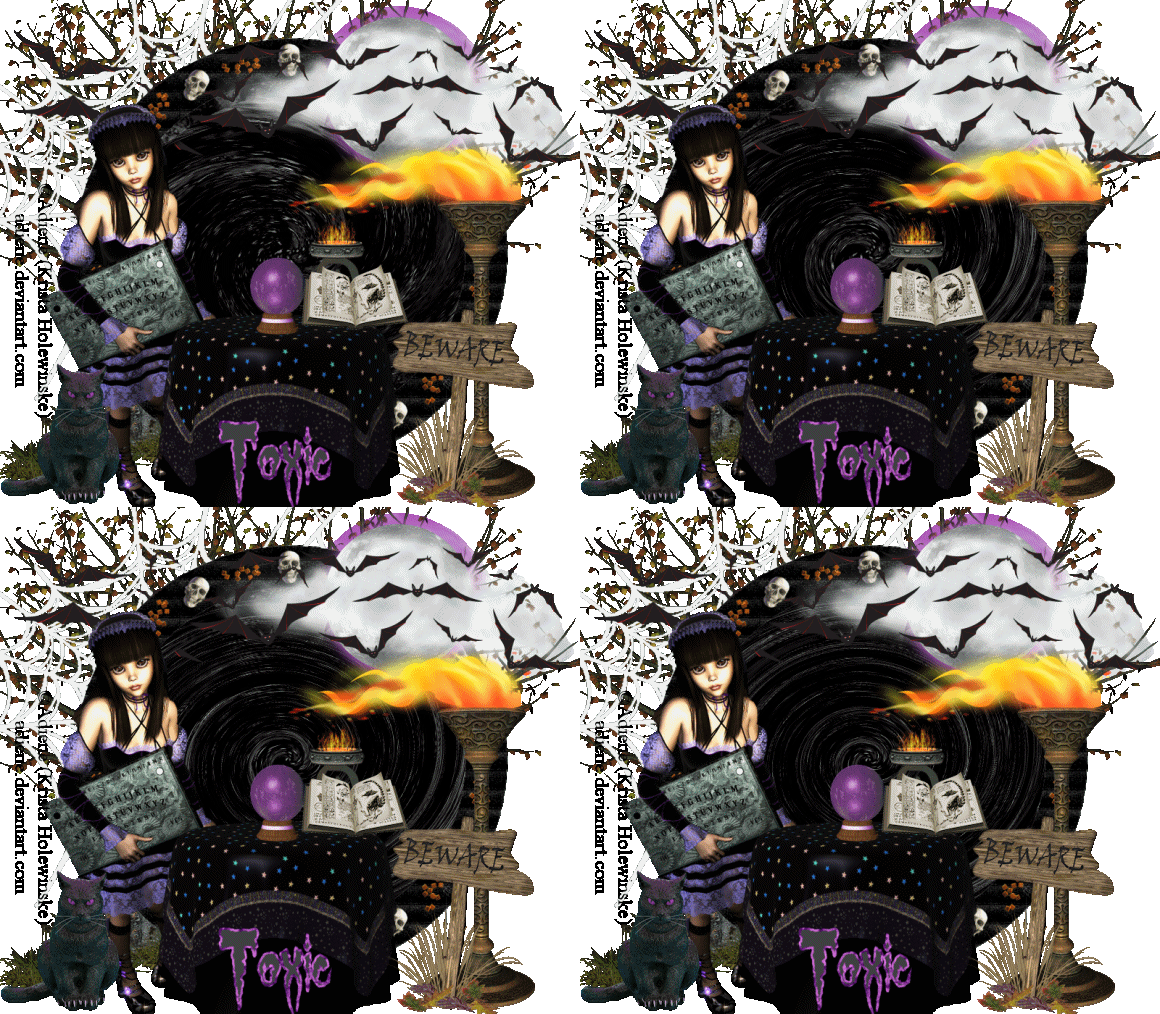
This tutorial is my creation & any resemblemces to others is purely accidental
Written by ToxicTutorialz on 9.19.12 in PSPX2
Written by ToxicTutorialz on 9.19.12 in PSPX2
Any PSP version should work
Do Not Claim as Your own
Link Back to My Blog
Link Back to My Blog
FTU Tube Want to Play
by Adiene @ adiene.deviantart.com
by Adiene @ adiene.deviantart.com
AnimationShop=AS
Copy/Paste=C/P
Copy/Paste=C/P
Let's Get Going
Open a 800 x 700 blank image
Bring Frame11 into psp and paste as new layer
Position in center of canvas
Use magicwand to select center of frame
Bring paper27 into psp
C/P as new layer over frame Selections Invert Delete Deselect
Move paper layer below frame layer
Duplicate your paper layer
Bring tree3 or one you like into psp
C/P as new layer Place over on left side
Move tree layer below your frame and paper layers
Bring brazier2 into psp
C/P as new layer & resize to 65% Place on bottom right side of frame
Bring the remaining elements into psp
BewareSign, Blackcat, BatBorder, FullMoon, SpellBook3, SpiderWeb and Scryingtable
C/P the web as new layer
Move this layer below all layers but above the tree and the original paper layers
Resize to 125% and move over to the left just a bit
C/P the ScryingTable as new layer
Place at bottom center of canvas
C/P remaining elements and place where you like best
Resize the cat to 45% and place over on the bottom left side
Resize the spellbook to 40% and place on table
C/P your tube as new layer and place over on the left side
Add your copywrite
Bring paper13 into psp & set as your Foreground
Background set on a dark color
Font set on GypsyCurse Size 30 Width 3
Type out your name Convert to raster layer
Jump onto your dup paper layer
Effects Distortion Effects Twirl on 335 degrees
Edit Copymerged Paste into AnimationShop as New Animation
Back to PSP
Apply the same effect again but this time at 340 degrees
Copymerged Paste into AS after currentframe
Back to psp
Apply same effect but this time at 350 degrees
Copymerged Paste into AS after currentframe
Back to psp
Apply twirl effect once more at 355 degrees
Paste into AS after currentframe
You should have 4 frames total in AnimationShop
Edit SelectAll Animation Frame Properties Set speed to 40
Animation Resize Animation to width 580 Height 507
View animation and save as gif
Open a 800 x 700 blank image
Bring Frame11 into psp and paste as new layer
Position in center of canvas
Use magicwand to select center of frame
Bring paper27 into psp
C/P as new layer over frame Selections Invert Delete Deselect
Move paper layer below frame layer
Duplicate your paper layer
Bring tree3 or one you like into psp
C/P as new layer Place over on left side
Move tree layer below your frame and paper layers
Bring brazier2 into psp
C/P as new layer & resize to 65% Place on bottom right side of frame
Bring the remaining elements into psp
BewareSign, Blackcat, BatBorder, FullMoon, SpellBook3, SpiderWeb and Scryingtable
C/P the web as new layer
Move this layer below all layers but above the tree and the original paper layers
Resize to 125% and move over to the left just a bit
C/P the ScryingTable as new layer
Place at bottom center of canvas
C/P remaining elements and place where you like best
Resize the cat to 45% and place over on the bottom left side
Resize the spellbook to 40% and place on table
C/P your tube as new layer and place over on the left side
Add your copywrite
Bring paper13 into psp & set as your Foreground
Background set on a dark color
Font set on GypsyCurse Size 30 Width 3
Type out your name Convert to raster layer
Jump onto your dup paper layer
Effects Distortion Effects Twirl on 335 degrees
Edit Copymerged Paste into AnimationShop as New Animation
Back to PSP
Apply the same effect again but this time at 340 degrees
Copymerged Paste into AS after currentframe
Back to psp
Apply same effect but this time at 350 degrees
Copymerged Paste into AS after currentframe
Back to psp
Apply twirl effect once more at 355 degrees
Paste into AS after currentframe
You should have 4 frames total in AnimationShop
Edit SelectAll Animation Frame Properties Set speed to 40
Animation Resize Animation to width 580 Height 507
View animation and save as gif

Tuesday, September 18, 2012
BloodMoon

This tutorial is my creation & any resemblemces to others is purely accidental
Written by ToxicTutorialz on 9.18.12 in PSPX2
Any PSP version should work
Written by ToxicTutorialz on 9.18.12 in PSPX2
Any PSP version should work
Do Not Claim as Your own
Link Back to My Blog
Remember to SAVE Often!!!
Font used GypsyCurse
fontspace.com
fontspace.com
PTU NOW FTU Kit
Because The Night by Digicats
Because The Night by Digicats
FTU Tube by ElectronicRainbow
This is a headshot and will need to be sized up
This is a headshot and will need to be sized up
Bring Frame4,mesh1,mesh4,scroll, crow, cloak, charm1, bloodspatter,
bottle1 & bottle2 and moon into psp
Resize frame to 70%
C/P MESH4 as new layer Move behind your frame layer
Resize to 140
Adjust Hue & Sat Colorize to red
Now c/p mesh1 as new layer place at the top as seen in tag above
Duplicate mesh1 layer Image Flip
Jump onto frame layer Use magicwand to select center
C/P the scroll as new layer Resize to 110%
On layer palette Move scroll layer below frame layer and Deselect
Copy/Paste the moon as new layer and place over on the upper right corner of frame
Now paste the bloodspatter as new layer and place on the moon
Copy/Paste your headshot tube or tube of choice
Add 2 gradient glows of white 3 and black 3 around your tube
Now add your remaining elements and place them at the bottom the way you like best
I colorized the bottles
Once you have your tag the way you like add your copywrite
Set your BG on a deep red and your fg on black
Font set on GypsyCurse Size 48 Type out your name Convert to Raster
Place on the moon
Merge all visible and resize to 70% all layers checked
Save as png
bottle1 & bottle2 and moon into psp
Resize frame to 70%
C/P MESH4 as new layer Move behind your frame layer
Resize to 140
Adjust Hue & Sat Colorize to red
Now c/p mesh1 as new layer place at the top as seen in tag above
Duplicate mesh1 layer Image Flip
Jump onto frame layer Use magicwand to select center
C/P the scroll as new layer Resize to 110%
On layer palette Move scroll layer below frame layer and Deselect
Copy/Paste the moon as new layer and place over on the upper right corner of frame
Now paste the bloodspatter as new layer and place on the moon
Copy/Paste your headshot tube or tube of choice
Add 2 gradient glows of white 3 and black 3 around your tube
Now add your remaining elements and place them at the bottom the way you like best
I colorized the bottles
Once you have your tag the way you like add your copywrite
Set your BG on a deep red and your fg on black
Font set on GypsyCurse Size 48 Type out your name Convert to Raster
Place on the moon
Merge all visible and resize to 70% all layers checked
Save as png
Subscribe to:
Posts (Atom)
LinkWithin

About Me

Grab My Blinkies


I CT for


Script Tester 4

My Stalker Hits
Blogs I stalk