My Avatars

Facebook Badge

followers

Popular Posts


Saturday, August 25, 2012
Skull Attitude
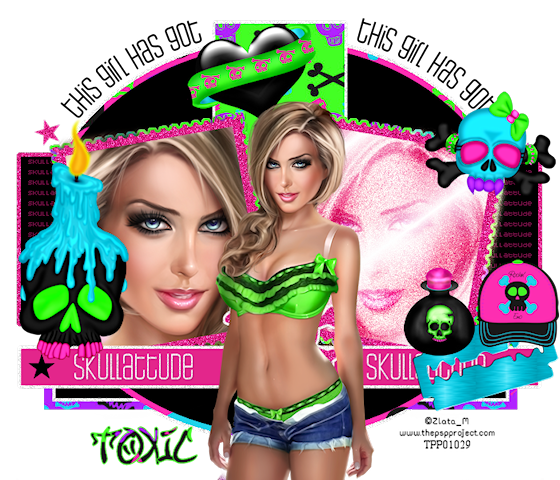
This tutorial is my creation & any resemblemces to others is purely accidental
Written by ToxicTutorialz on 8.25.12 in PSPX2
Any version should work
Written by ToxicTutorialz on 8.25.12 in PSPX2
Any version should work
Do Not Claim as Your own
Link Back to My Blog
Remember to SAVE Often!!!
Link Back to My Blog
Remember to SAVE Often!!!
Version of PSP
Pull your template and tube into psp
Delete the credits and white background on template
Starting with pink rectangle bottom
Pull paper9 into psp
Use magicwand to select your rectangle
C/P your paper as new layer Selections Invert Delete Deselect
Jump up to your pink oval layer
Using magicwand once again Select
Pull paper11 into psp & paste as new layer
Invert Delete Deselect
Jump up to pink top rectangle
Repeat using paper2
Now jump up to GlitterFrameBack Layer
Repeat the above steps using paper5
Open your FrameBack Left & Right layers
Jump back down to Paper glitterbackframe which is raster5 for me
Selections Select All Float Defloat
C/P your closeup tube as new layer
Place your close up the way you like inside left frame
Deselect
Use your eraser to erase any outside overhang on your tube
Duplicate Image Mirror
On duplicate closeup Duplicate
Rename Dup1 & dup2
On dup1 Add a noise 68 Gaussian & Monochrome both checked
On dup2 Change Blendmode to Screen
Now paste your main tube as new layer
Resize to 50% Position in center of template
If you have any layers closed at this point Open them
Bring elements 2,16,18,33,39,&40 into psp
Also bring paper1 into psp
Start pasting your elements as new layers and resize as necessary
Place them where you like best
You can use my tag above for reference if you like
Set your paper as BG on your material palette and light green as your fg
Font set on street soul size 72 Stroke 1 Type out your name
Convert to raster layer & place on bottom left
Finally add your copywrite
Merge all visible and resize all layers to 80%
Save as png
Delete the credits and white background on template
Starting with pink rectangle bottom
Pull paper9 into psp
Use magicwand to select your rectangle
C/P your paper as new layer Selections Invert Delete Deselect
Jump up to your pink oval layer
Using magicwand once again Select
Pull paper11 into psp & paste as new layer
Invert Delete Deselect
Jump up to pink top rectangle
Repeat using paper2
Now jump up to GlitterFrameBack Layer
Repeat the above steps using paper5
Open your FrameBack Left & Right layers
Jump back down to Paper glitterbackframe which is raster5 for me
Selections Select All Float Defloat
C/P your closeup tube as new layer
Place your close up the way you like inside left frame
Deselect
Use your eraser to erase any outside overhang on your tube
Duplicate Image Mirror
On duplicate closeup Duplicate
Rename Dup1 & dup2
On dup1 Add a noise 68 Gaussian & Monochrome both checked
On dup2 Change Blendmode to Screen
Now paste your main tube as new layer
Resize to 50% Position in center of template
If you have any layers closed at this point Open them
Bring elements 2,16,18,33,39,&40 into psp
Also bring paper1 into psp
Start pasting your elements as new layers and resize as necessary
Place them where you like best
You can use my tag above for reference if you like
Set your paper as BG on your material palette and light green as your fg
Font set on street soul size 72 Stroke 1 Type out your name
Convert to raster layer & place on bottom left
Finally add your copywrite
Merge all visible and resize all layers to 80%
Save as png
Thursday, August 23, 2012
Wall Graffiti
This tutorial is my creation & any resemblemces to others is purely accidental
Written by ToxicTutorialz on 8.23.12 in PSPX2
Any version should work
Do Not Claim as Your own
Link Back to My Blog
Remember to SAVE Often!!!
Version of PSP
PTU Kit Seduction
by MistyLynnsCreations
by MistyLynnsCreations
PTU Tube by
Keith Garvey
You may now purchase his tubes from his personal store here
This tube is from pte -pte is now closed
Keith Garvey
You may now purchase his tubes from his personal store here
This tube is from pte -pte is now closed
Plugin used
EC5 TEXTURE/Brickwall
EC5 TEXTURE/Brickwall
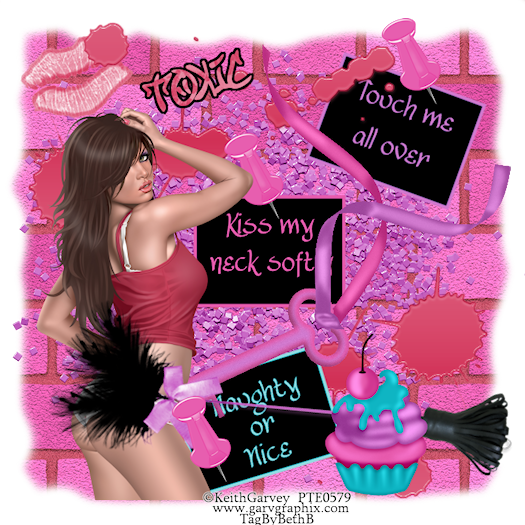
Let's begin by opening a 700 x 700 blank image
Pull paper14 into psp and c/p as new layer onto blank image
Hit the basic tab inside ec5
Set your brick height to 100, Aspect Ratio to 2.75, Brick Pattern to English,
Brick Color #f56abb, Montar Color #b94e62 All other default, Click ok
Use your eraser size 78 and erase the outside edges all the way around
C/P your tube as new layer
Place on bottom left side on background
Pull lips1 into psp and paste onto image
Resize to 35% Place at top on left side
Move lips layer below tube layer
Pull words 1,2,& 3 into psp
C/p each one as new layers and place where you like on right side of background
Pull sparkle2 and key into psp
Paste key as new layer and move over to the right side just a bit
Paste your sparkle
Move sparkle layer below all layers but Background layer
Pull splatter2 into psp
Paste and move to the top and over to the right just a little
Duplicate Image Mirror Flip
Pull whip into psp and paste
Use your pick tool to pull up so that the feather is touchin your tube's hiney
Pull pin2 into psp and paste
Resize to 30% and place on words duplicate twice and repeat
Add another element of choice. Place at bottom.
Pull paper8 into psp Set as your BG on material palette
FG Null
Font set on StreetSoul Size 28
Type out your name and place at top of tube.
Convert to raster layer
Selections Select All Float Defloat Modify Expand by 4
Add new layer below your name Floodfill with black Deselect
Add your copywrite
Pull paper14 into psp and c/p as new layer onto blank image
Hit the basic tab inside ec5
Set your brick height to 100, Aspect Ratio to 2.75, Brick Pattern to English,
Brick Color #f56abb, Montar Color #b94e62 All other default, Click ok
Use your eraser size 78 and erase the outside edges all the way around
C/P your tube as new layer
Place on bottom left side on background
Pull lips1 into psp and paste onto image
Resize to 35% Place at top on left side
Move lips layer below tube layer
Pull words 1,2,& 3 into psp
C/p each one as new layers and place where you like on right side of background
Pull sparkle2 and key into psp
Paste key as new layer and move over to the right side just a bit
Paste your sparkle
Move sparkle layer below all layers but Background layer
Pull splatter2 into psp
Paste and move to the top and over to the right just a little
Duplicate Image Mirror Flip
Pull whip into psp and paste
Use your pick tool to pull up so that the feather is touchin your tube's hiney
Pull pin2 into psp and paste
Resize to 30% and place on words duplicate twice and repeat
Add another element of choice. Place at bottom.
Pull paper8 into psp Set as your BG on material palette
FG Null
Font set on StreetSoul Size 28
Type out your name and place at top of tube.
Convert to raster layer
Selections Select All Float Defloat Modify Expand by 4
Add new layer below your name Floodfill with black Deselect
Add your copywrite
Merge all visible
Image Resize to 75% all layers checked
Save as PNG
Subscribe to:
Posts (Atom)
LinkWithin

About Me

Grab My Blinkies


I CT for


Script Tester 4

My Stalker Hits
Blogs I stalk