My Avatars


Facebook Badge

followers

Popular Posts


Monday, September 24, 2012
Got Blood
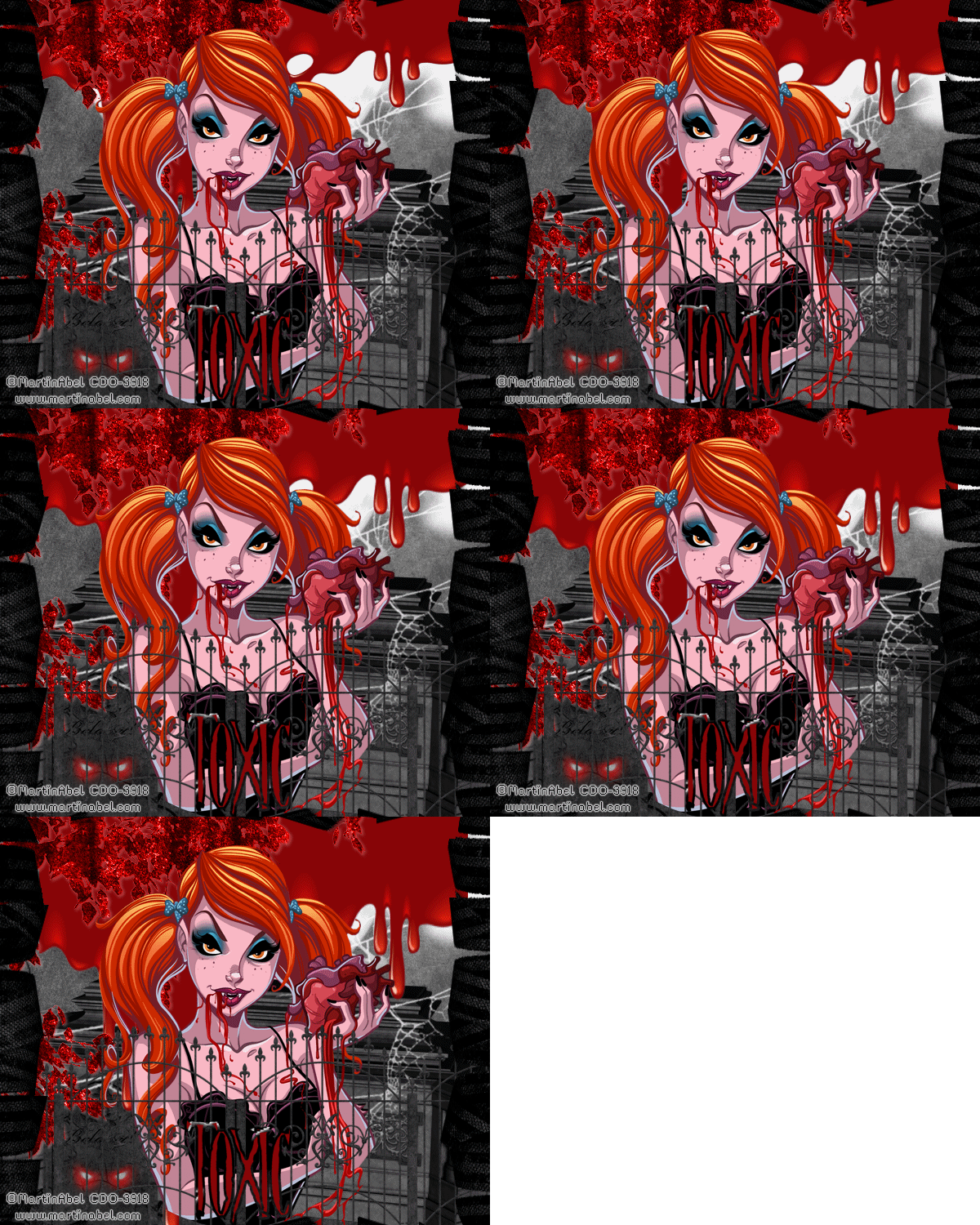
This tutorial is my creation & any resemblemces to others is purely accidental
Written by ToxicTutorialz on 9.24.12 in PSPX2
Any PSP version should work
Written by ToxicTutorialz on 9.24.12 in PSPX2
Any PSP version should work
Do Not Claim as Your own
Link Back to My Blog
Remember to SAVE Often!!!
PTU Kit used Vamp by AddictivePleasures
PTU Tube Got-Blood by MartinAbel
Purchase it at CDO
Font NightMare S
Download at dafont.com
AnimationShop
Plugins MM/CLOUD Xenofex2/RIP OPEN
Link Back to My Blog
Remember to SAVE Often!!!
PTU Kit used Vamp by AddictivePleasures
PTU Tube Got-Blood by MartinAbel
Purchase it at CDO
Font NightMare S
Download at dafont.com
AnimationShop
Plugins MM/CLOUD Xenofex2/RIP OPEN
Let's get started
Open a 600 x 500 blank image
Bring P5 into psp and paste onto image as new layer
Bring p11 into psp and paste as new layer
Effects Plugins Xeno2/RipOpen & Apply the settings listed below in image
Open a 600 x 500 blank image
Bring P5 into psp and paste onto image as new layer
Bring p11 into psp and paste as new layer
Effects Plugins Xeno2/RipOpen & Apply the settings listed below in image

Now go to adjust Hue & Sat Colorize & Move the slider all the way to the left
Bring fence into psp and paste as new layer
Move below your ripopen paper layer on layer palette
Bring leaves into psp and paste
Move to upper left corner and colorize to red
Bring moon into psp and paste
Move toward the top
Place in center behind leaves and fence
Bring coffin2 into psp and paste as new layer
Move coffin layer below fence layer but above moon layer
I also brought spiderweb, cloud, headstone, roses, lightpost, and blood3 into psp
Copy & Paste the cloud as new layer and place on right upper side of image
Now paste your remaining elements except the blood and place where you like best
Copy & Paste your blood as new layer and place at the top
Use pick tool to stretch it across the image
Now move this layer below your leaves layer but above the web, coffin layers
Paste your tube as new layer
If you used same tube as me make sure this layer is below fence layer but above your leaves and blood layers
Font on NightMare size 36 Stroke 3 BG #870608 FG Paper4
Type out your name Convert to raster
Add your copywrite
Edit CopyMerged Paste into AnimationShop as New Animation
Back to PSP
Hightlight your bloodlayer
Use picktool and pull down on bottom node
Edit CopyMerged Paste after currentframe in AnimationShop
Back to Psp and Repeat the picktool again
Edit CopyMerged Paste after currentframe in AnimationShop
Keep Repeating the above steps til you have 5 frames in AnimationShop
In AnimationShop
Edit SelectAll Aniamtion Frame Properties Set speed to 100
Highlight last frame and change speed to 110
Move the slider back to first frame
Edit Select All Animation View and save

Sunday, September 23, 2012
Demons n the Night
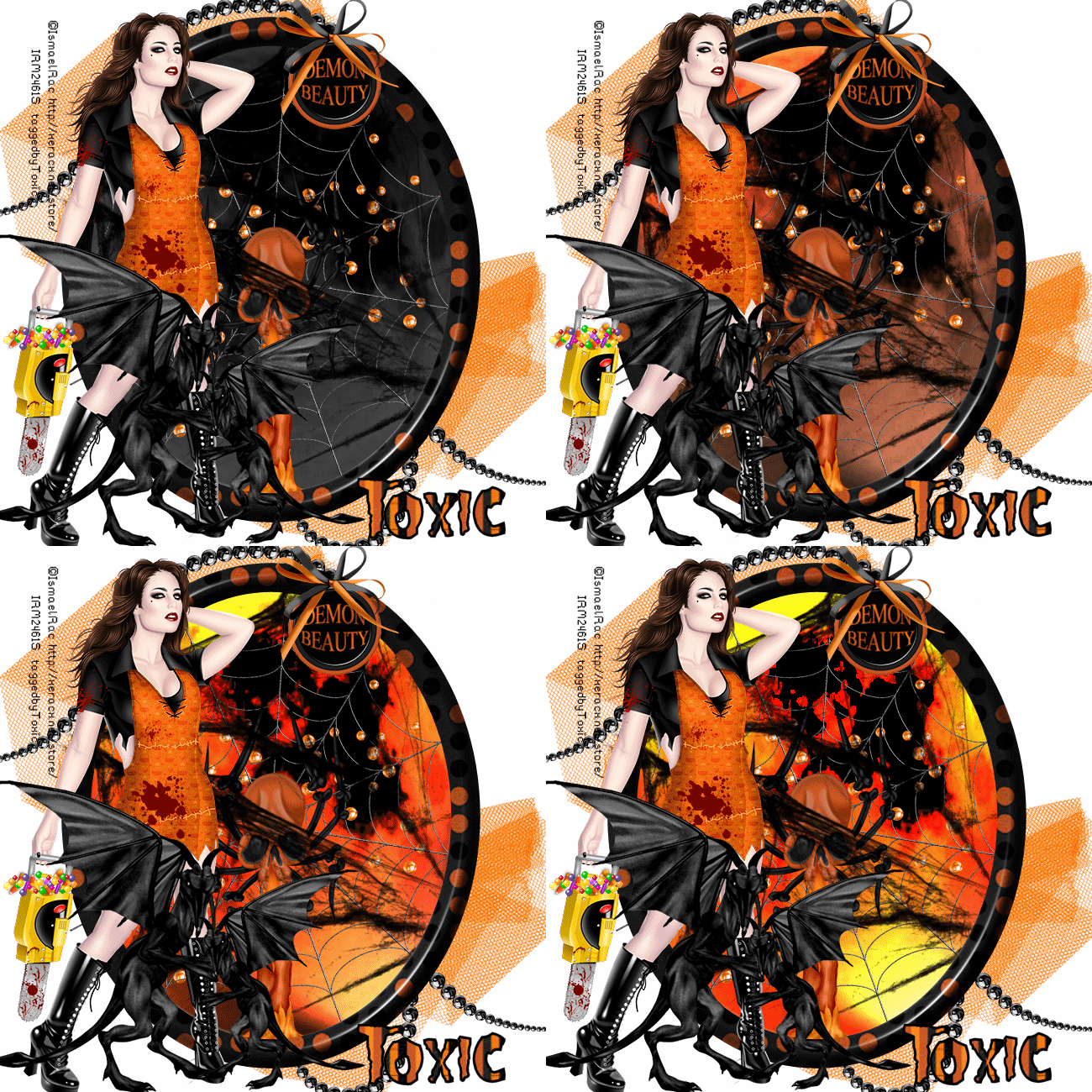
This tutorial is my creation & any resemblemces to others is purely accidental
Written by ToxicTutorialz on 9.23.12 in PSPX2
Any PSP version should work
Do Not Claim as Your own
Link Back to My Blog
Remember to SAVE Often!!!
PTU Kit used DemonBeauty by AddictivePleasures
PTU Tube used Devious by Ismael Rac /You may buy it here
Font used Misfits / download at fontspace.com
AnimationShop
PTU Tube used Devious by Ismael Rac /You may buy it here
Font used Misfits / download at fontspace.com
AnimationShop
Open a new image 650 x 650 transparent
Preset shape set on ellipse width36 FG on paper9 BG on Null
Draw out a large oval
Apply a bevelboss of choice
Pull web into psp
Copy/Paste as new layer Place inside frame toward the top
Duplicate web Image Mirror flip
Grab eraser size 25 and erase any overhang outside of frame on both web layers
Move weblayers below your frame layer
Pull moon into psp and paste as new layer inside frame
Use your picktool to stetch out from top to bottom and from left to right
Move below frame and web layers
Pull spiderweb into psp and paste inside frame
Make sure this layer is above moon but below webs and frame layers
Pull netting into psp and paste as new layer
Move netting layer below all layers and place in top left corner
Duplicate Image Flip and place in lower right corner
Pull beads2 into psp
C/P inside frame as new layer
Pull pearls into psp
Copy & Paste as new layer Place in top left corner
Move this layer below moon layer but above netting layers
Duplicate Image Mirror Flip and then flip again Position in bottom right corner
C&P your tube as new layer Position on the LEFT side of frame
Pull gargoyle into psp and paste as new layer on bottom right side
We want it to make it look as if he is grabbin your tube's leg
Place between her legs
Resize to 55% and duplicate Place on the outside of her right leg
Pull candle, bow4 and button into psp
C&P the button as new layer and resize to 45%
Place in the upper right side on frame
Repeat for the bow and place on button
Paste the candle as new layer and place at the bottom on right side
Add your copywrite
Pull paper11 into psp and set as BG FG on Black
Font on Misfits Size 24 Stroke3
Type out your name and convert to raster layer
Place on the bottom right side
Jump down to the very bottom layer and floodfill with white
Now comes the fun part
Open animation shop
Edit Copymerged and Paste into Animation Shop as New Animation
Back to PSP
Jump up onto your moon layer and apply
Effects Illumination Lights and apply the settings shown below
Preset shape set on ellipse width36 FG on paper9 BG on Null
Draw out a large oval
Apply a bevelboss of choice
Pull web into psp
Copy/Paste as new layer Place inside frame toward the top
Duplicate web Image Mirror flip
Grab eraser size 25 and erase any overhang outside of frame on both web layers
Move weblayers below your frame layer
Pull moon into psp and paste as new layer inside frame
Use your picktool to stetch out from top to bottom and from left to right
Move below frame and web layers
Pull spiderweb into psp and paste inside frame
Make sure this layer is above moon but below webs and frame layers
Pull netting into psp and paste as new layer
Move netting layer below all layers and place in top left corner
Duplicate Image Flip and place in lower right corner
Pull beads2 into psp
C/P inside frame as new layer
Pull pearls into psp
Copy & Paste as new layer Place in top left corner
Move this layer below moon layer but above netting layers
Duplicate Image Mirror Flip and then flip again Position in bottom right corner
C&P your tube as new layer Position on the LEFT side of frame
Pull gargoyle into psp and paste as new layer on bottom right side
We want it to make it look as if he is grabbin your tube's leg
Place between her legs
Resize to 55% and duplicate Place on the outside of her right leg
Pull candle, bow4 and button into psp
C&P the button as new layer and resize to 45%
Place in the upper right side on frame
Repeat for the bow and place on button
Paste the candle as new layer and place at the bottom on right side
Add your copywrite
Pull paper11 into psp and set as BG FG on Black
Font on Misfits Size 24 Stroke3
Type out your name and convert to raster layer
Place on the bottom right side
Jump down to the very bottom layer and floodfill with white
Now comes the fun part
Open animation shop
Edit Copymerged and Paste into Animation Shop as New Animation
Back to PSP
Jump up onto your moon layer and apply
Effects Illumination Lights and apply the settings shown below
insert image1
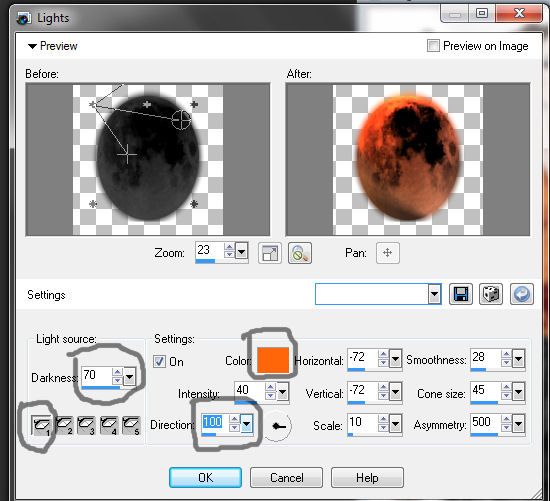
Edit CopyMerged Paste into Animation Shop after CurrentFrame
Back to PSP
Apply same effect as in image 2 below
Back to PSP
Apply same effect as in image 2 below
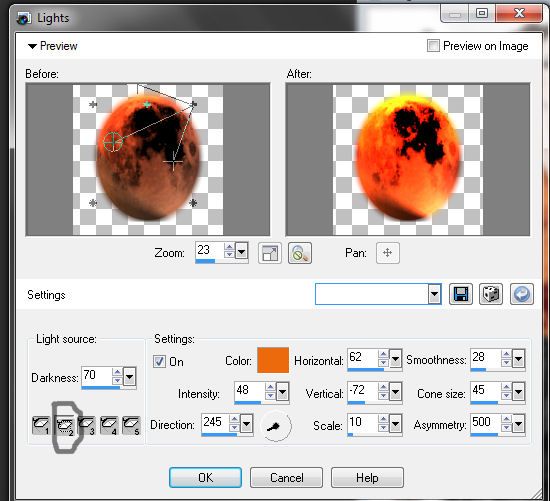
Edit CopyMerged Paste into Animation Shop after Currentframe
Back to PSP
Repeat same effect as seen in below image3
Back to PSP
Repeat same effect as seen in below image3
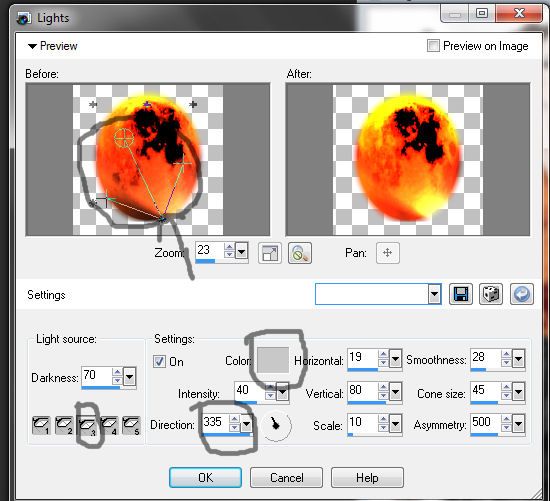
Paste into Animation Shop as before
Now in animationshop Edit Select All Animation Frame Properties
Set speed to 40 View Animation and Save
Now in animationshop Edit Select All Animation Frame Properties
Set speed to 40 View Animation and Save
Subscribe to:
Posts (Atom)
LinkWithin

About Me

Grab My Blinkies


I CT for


Script Tester 4

My Stalker Hits
Blogs I stalk