My Avatars


Facebook Badge

followers

Popular Posts


Saturday, October 13, 2012
Puff Puff Pass

This tutorial is my creation & any resemblences to others is purely accidental
Written by ToxicTutorialz on 10.13.12 in PSPX2
Any PSP version should work
Do Not Claim as Your own
Link Back to My Blog
Remember to SAVE Often!!!
PTU Tube WeedGirl by Celinart
Buy it at SATC
Buy it at SATC
Font used Cannabis
Download it at fontspace.com
Download it at fontspace.com
TBT_CMCMC_Mask2-Sorry I don't remember where I got this mask-If it is yours please email me
@ bethbarnes02@gmail.com and I will credit you
@ bethbarnes02@gmail.com and I will credit you
Pull frame into psp
Resize to 90%
Magicwand Select center of frame
Pull wire into psp and paste as new layer
Selections Invert Delete Deselect
Pull glitter into psp & paste as new layer
Move glitter & wire layers below frame layer
Pull nailpolish into psp & paste
Place at the top left side on frame
C/P your tube as new layer
Place on frame Resize to 45%
Use eraser to erase bottom overhang
On layer palette Move the glitter below all layers & the wire frame above the glitter layer
Now move your tube layer below wire but above glitter layer
Pull paper1 into psp and paste Make sure it is at the bottom on layer palette
Apply your mask of choice
Right click on mask layer and merge group
Pull sparkles into psp and paste
Duplicate and rotate by 90 left Place where you like
C/P your tube once more
Resize to 40% then again to 55%
Place over on right bottom side just a little
Pull elements of choice into psp
I used lips2, leaf3, bag2, leaf , hat, & tag
Place them around your tag as you like best
Jump back up to your 1st tube layer inside frame and change blend mode to Luminance (L)
Add your copywrite
Set font on sweetleaf size 28 BG on paper4 FG on black
Type out your name Convert to raster Place where you like best
Resize to 85% and add a small white gradient glow of 3.00
Merge all visible and save
Resize to 90%
Magicwand Select center of frame
Pull wire into psp and paste as new layer
Selections Invert Delete Deselect
Pull glitter into psp & paste as new layer
Move glitter & wire layers below frame layer
Pull nailpolish into psp & paste
Place at the top left side on frame
C/P your tube as new layer
Place on frame Resize to 45%
Use eraser to erase bottom overhang
On layer palette Move the glitter below all layers & the wire frame above the glitter layer
Now move your tube layer below wire but above glitter layer
Pull paper1 into psp and paste Make sure it is at the bottom on layer palette
Apply your mask of choice
Right click on mask layer and merge group
Pull sparkles into psp and paste
Duplicate and rotate by 90 left Place where you like
C/P your tube once more
Resize to 40% then again to 55%
Place over on right bottom side just a little
Pull elements of choice into psp
I used lips2, leaf3, bag2, leaf , hat, & tag
Place them around your tag as you like best
Jump back up to your 1st tube layer inside frame and change blend mode to Luminance (L)
Add your copywrite
Set font on sweetleaf size 28 BG on paper4 FG on black
Type out your name Convert to raster Place where you like best
Resize to 85% and add a small white gradient glow of 3.00
Merge all visible and save

HarvestPatch
This tutorial is my creation & any resemblences to others is purely accidental
Written by ToxicTutorialz on 10.13.12 in PSPX2
Written by ToxicTutorialz on 10.13.12 in PSPX2
Any PSP version should work
Do Not Claim as Your own
Link Back to My Blog
Remember to SAVE Often!!!
Do Not Claim as Your own
Link Back to My Blog
Remember to SAVE Often!!!
PTU Tube by Alex Prihodko
buy it at PFD
buy it at PFD
Font called Always Forever or britany murphy
download at fontspace.com
download at fontspace.com
TT HarvestPatch Template Here
Open the template in psp & delete the watermark
Close off all layers except the bottom oval layer
Add a noise of 16 gaussian and monochrome ticked Ok
Open 2nd oval layer
Bring paper14 into psp
Magicwand to select oval C/P Paper as new layer Selections Invert Delete Deseelct
Jump on raster4 layer
Bring paper11 into psp and repeat as we did before
Keep repeating with all layers til you are happy with it
I left raster 5 ,7 and duplicate 7 as is
Once you are with the template
Copy & Paste your tube a snew layer and resize to 50%
Align in center of template
Let's start adding some elements
Bring PPT13 into psp
C/P as new layer and move below tube layer on layer palette
RESIZE TO 90%
Bring elements 33 & 34 into psp
C/P element 34 as new layer and resize to 40% Place on right side on square
Repeat for element 33 but resize to 35% and place on left side square
Bring the single leaves into psp and paste as new layers
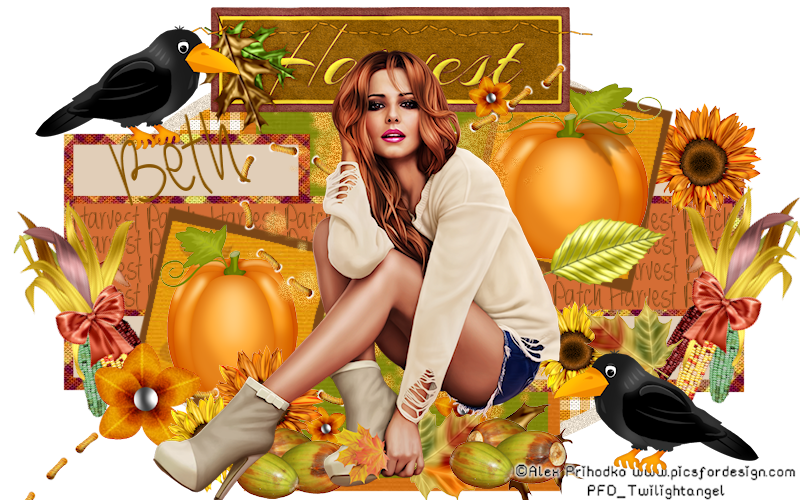
Resize them between 20 and 25% Place them around your template as seen in my tag above
Bring PPT60 into psp and paste
Place behind tube
Bring PPT 70 into psp Paste as new layer Resize to 55% Place at top behind tube
Now just start adding elements you like and place around your template
Set your font on Always Forever size 26 BG on color from image
Type out your name Convert to raster and place where you like
Add your copywrite
Merge all visible and save
Close off all layers except the bottom oval layer
Add a noise of 16 gaussian and monochrome ticked Ok
Open 2nd oval layer
Bring paper14 into psp
Magicwand to select oval C/P Paper as new layer Selections Invert Delete Deseelct
Jump on raster4 layer
Bring paper11 into psp and repeat as we did before
Keep repeating with all layers til you are happy with it
I left raster 5 ,7 and duplicate 7 as is
Once you are with the template
Copy & Paste your tube a snew layer and resize to 50%
Align in center of template
Let's start adding some elements
Bring PPT13 into psp
C/P as new layer and move below tube layer on layer palette
RESIZE TO 90%
Bring elements 33 & 34 into psp
C/P element 34 as new layer and resize to 40% Place on right side on square
Repeat for element 33 but resize to 35% and place on left side square
Bring the single leaves into psp and paste as new layers
Resize them between 20 and 25% Place them around your template as seen in my tag above
Bring PPT60 into psp and paste
Place behind tube
Bring PPT 70 into psp Paste as new layer Resize to 55% Place at top behind tube
Now just start adding elements you like and place around your template
Set your font on Always Forever size 26 BG on color from image
Type out your name Convert to raster and place where you like
Add your copywrite
Merge all visible and save
Subscribe to:
Posts (Atom)
LinkWithin

About Me

Grab My Blinkies


I CT for


Script Tester 4

My Stalker Hits
Blogs I stalk