My Avatars


Facebook Badge

followers

Popular Posts


Thursday, October 11, 2012
Devil from HELL
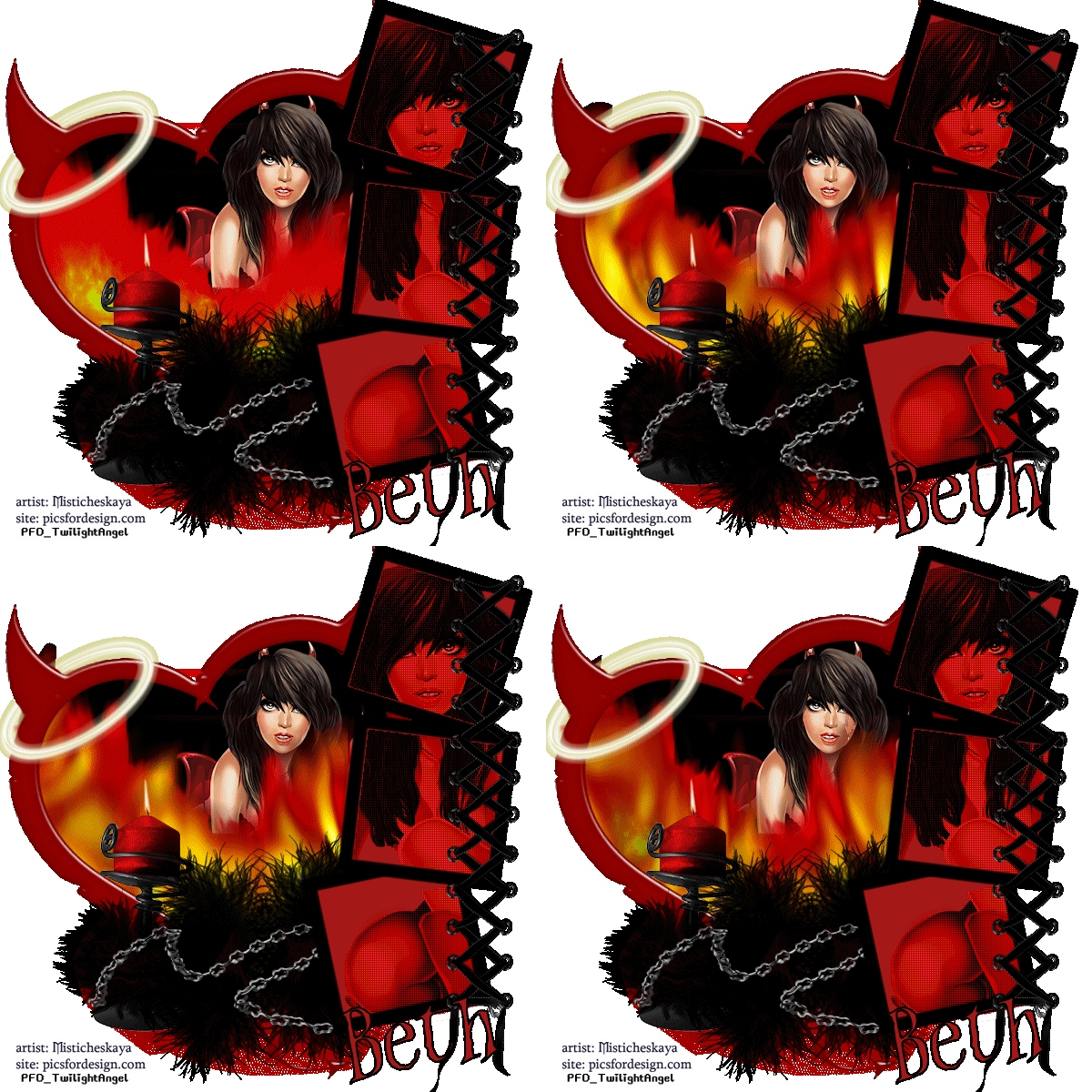
This tutorial is my creation & any resemblences to others is purely accidental
Written by ToxicTutorialz on 10.11.12 in PSPX2
Written by ToxicTutorialz on 10.11.12 in PSPX2
Any PSP version should work
Do Not Claim as Your own
Link Back to My Blog
Remember to SAVE Often!!!
Do Not Claim as Your own
Link Back to My Blog
Remember to SAVE Often!!!
PTU KIt called Angel or Devil (Red) by AddictivePleasures
DevilTube by LadyMishka Buy it at PFD
AnimationShop
Eyecandy4/fire
Font called WitchesMagic from fontspace.com
Start with a 600 x 600 blank image
Set presetshape to rectangle width15
Background on #a51918 Foreground on #000000
Draw out a med size rectangle
Convert to raster
Use picktool to push up on control arm
Place on right side
Duplicate Place below the top rectangle
Duplicate and place below the middle rectangle
Line them up the way you like
Drag laceup into psp and paste as new layer
Place on far right side on all 3 frames
Use magicwand to select center of all 3 frames
Copy/Paste your tube as new layer
Selections Invert Delete Deselect
Apply a texture of choice I used penta.com / colordot
Duplicate your tube layer
On original change the blendmode to burn
On duplicate change blendmode to soft light
Drag frame4 into psp and paste onto image as new layer
Grab magicwand again and select center of frame
Selections Modify Expand by 3 Add new layer
Floodfill with black DO NOT DESELECT YET!!!
Drag fire into psp and paste as new layer
Line up inside frame at bottom Selections Invert Delete
Duplicate your fire Image Mirror Line up on left side
Erase any outside overhang
Magicwand once again selecting inside frame
C/P tube as new layer Resize to 65% Align the way you like best
Selections Invert Delete Deselect
Move tube layer below frame and fire layers on alyer pallete
Drag halo into psp
Copy/Paste as new layer Place on the horn as seen in tag above
Erase bits of the halo so that its wrapped around horn
Drag netting into psp and paste
Place at bottom of devilframe
Move below the frame and fire layers on layer palette
Drag feathers and chain into psp
Paste feathers as new layer and place on bottom of frame
Duplicate feathers and place to the right just a bit
Now paste the chain
See my tag above for placement
Drag candle into psp and paste
Resize to 65% and place on the bottom left side
Place your feather and chain over the candle as seen in my tag above
Add your copywrite
Add your name using the font witchesmagic size 20 stroke2
Jump back on your fire layers and merge down
Edit CopyMerged
Open Animationshop and paste as new animation
Back to psp
On fire layers Selections Select All Float Defloat
Effects Plugins EC4/Fire with the below settings
Set presetshape to rectangle width15
Background on #a51918 Foreground on #000000
Draw out a med size rectangle
Convert to raster
Use picktool to push up on control arm
Place on right side
Duplicate Place below the top rectangle
Duplicate and place below the middle rectangle
Line them up the way you like
Drag laceup into psp and paste as new layer
Place on far right side on all 3 frames
Use magicwand to select center of all 3 frames
Copy/Paste your tube as new layer
Selections Invert Delete Deselect
Apply a texture of choice I used penta.com / colordot
Duplicate your tube layer
On original change the blendmode to burn
On duplicate change blendmode to soft light
Drag frame4 into psp and paste onto image as new layer
Grab magicwand again and select center of frame
Selections Modify Expand by 3 Add new layer
Floodfill with black DO NOT DESELECT YET!!!
Drag fire into psp and paste as new layer
Line up inside frame at bottom Selections Invert Delete
Duplicate your fire Image Mirror Line up on left side
Erase any outside overhang
Magicwand once again selecting inside frame
C/P tube as new layer Resize to 65% Align the way you like best
Selections Invert Delete Deselect
Move tube layer below frame and fire layers on alyer pallete
Drag halo into psp
Copy/Paste as new layer Place on the horn as seen in tag above
Erase bits of the halo so that its wrapped around horn
Drag netting into psp and paste
Place at bottom of devilframe
Move below the frame and fire layers on layer palette
Drag feathers and chain into psp
Paste feathers as new layer and place on bottom of frame
Duplicate feathers and place to the right just a bit
Now paste the chain
See my tag above for placement
Drag candle into psp and paste
Resize to 65% and place on the bottom left side
Place your feather and chain over the candle as seen in my tag above
Add your copywrite
Add your name using the font witchesmagic size 20 stroke2
Jump back on your fire layers and merge down
Edit CopyMerged
Open Animationshop and paste as new animation
Back to psp
On fire layers Selections Select All Float Defloat
Effects Plugins EC4/Fire with the below settings
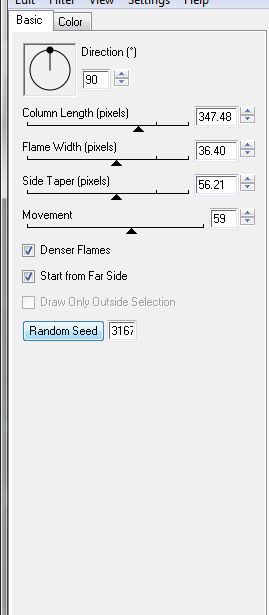
Deselect
Edit CopyMerged Paste into Animationshop after currentframe
Back to psp
Hit Undo twice
Reapply the fire plugin except hit seed twice
Deselect
Paste in animationshop after current frame
Back to psp again
Hit undo twice
Reapply same plugin once more hitting random seed twice
Deselect
Paste in animationshop once again after currentframe
Edit Select All Animation Frame Properties Set speed to 45
View your animation and save.

Wednesday, October 10, 2012
Rapture Me
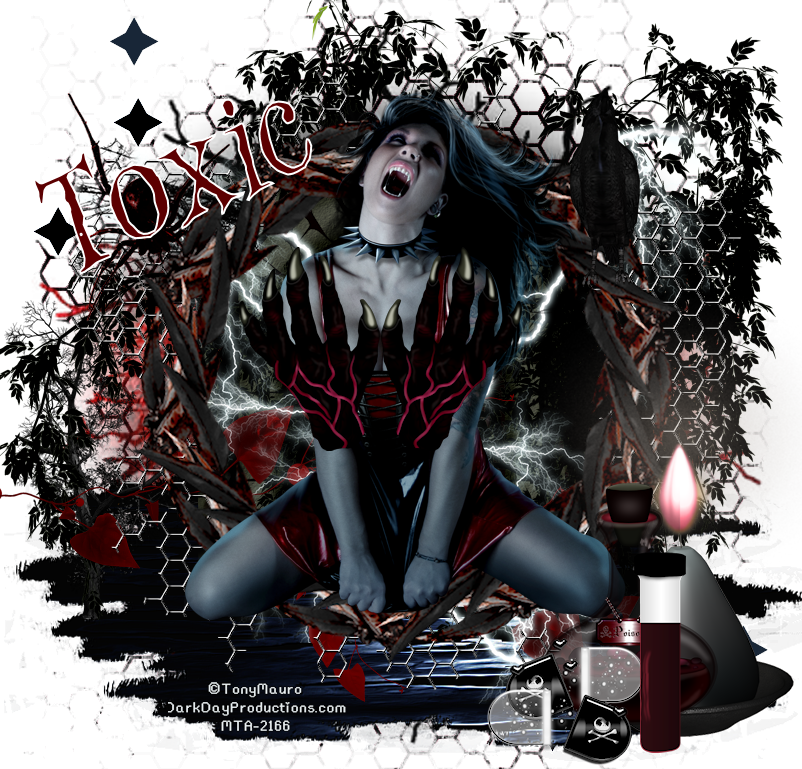
This tutorial is my creation & any resemblences to others is purely accidental
Written by ToxicTutorialz on 10.10.12 in PSPX2
Written by ToxicTutorialz on 10.10.12 in PSPX2
Any PSP version should work
Do Not Claim as Your own
Link Back to My Blog
Remember to SAVE Often!!!
Link Back to My Blog
Remember to SAVE Often!!!
This tut requires alot of patience and elements so be prepared..
PTU Tube by Tony Mauro
You can purchase his tubes at MTA
You can purchase his tubes at MTA
Font called WitchesMagic
Download it at fontspace.com
Download it at fontspace.com
Mask2 by WSL Here
Drag frame2 into psp
Resize to 85%\
Drag paper1 into psp
Add new layer
Move below your frame layer
Magicwand and click outside of frame
Click your bottom layer
Paste your paper as new layer
Apply your mask2 from disk
Deselect
Drag element100 into psp & paste
Drag below your mask and frame layers
Drag element77 into psp
Paste as new layer and drag below mask,frame layers but above wire layer
Drag element49 into psp and paste
Place at bottom of canvas
On your layer palette drag above the mask layer but below the frame
Paste your tube as new layer
Position inside the frame but on layer palette drag above your frame layer
See tag above for placement
Drag element12 into psp
Resize to 25%
Copy/Paste onto canvas as new layer
Position on frame branch on right side
Drag element8 into psp and paste
Resize to 50%
Position in frame
Move below frame layer on layer palette
Drag elements 38,13, and 92 into psp
Paste element 13 as new layer
Resize to 45% and place on bottom left side
Paste element38 as new layer
Image Mirror and place on right side behind all
Drag element 20 into psp and paste
Place inside frame and resize to 45%
DUPLICATE AND MIRROR
Duplicate and flip
Paste element92 as new layer
Resize to 50% and place on tube close to her neck
Add other elements you like
Add your copywrite
Set font on WitchesMagic size 26 B=bold Stroke2
BG ona color from tube FG on white
Type out your name Convert to raster layer
Merge all visible and save as png
Resize to 85%\
Drag paper1 into psp
Add new layer
Move below your frame layer
Magicwand and click outside of frame
Click your bottom layer
Paste your paper as new layer
Apply your mask2 from disk
Deselect
Drag element100 into psp & paste
Drag below your mask and frame layers
Drag element77 into psp
Paste as new layer and drag below mask,frame layers but above wire layer
Drag element49 into psp and paste
Place at bottom of canvas
On your layer palette drag above the mask layer but below the frame
Paste your tube as new layer
Position inside the frame but on layer palette drag above your frame layer
See tag above for placement
Drag element12 into psp
Resize to 25%
Copy/Paste onto canvas as new layer
Position on frame branch on right side
Drag element8 into psp and paste
Resize to 50%
Position in frame
Move below frame layer on layer palette
Drag elements 38,13, and 92 into psp
Paste element 13 as new layer
Resize to 45% and place on bottom left side
Paste element38 as new layer
Image Mirror and place on right side behind all
Drag element 20 into psp and paste
Place inside frame and resize to 45%
DUPLICATE AND MIRROR
Duplicate and flip
Paste element92 as new layer
Resize to 50% and place on tube close to her neck
Add other elements you like
Add your copywrite
Set font on WitchesMagic size 26 B=bold Stroke2
BG ona color from tube FG on white
Type out your name Convert to raster layer
Merge all visible and save as png
Subscribe to:
Posts (Atom)
LinkWithin

About Me

Grab My Blinkies


I CT for


Script Tester 4

My Stalker Hits

Blogs I stalk

