My Avatars


Facebook Badge

followers


Sunday, September 2, 2012
Vampiress
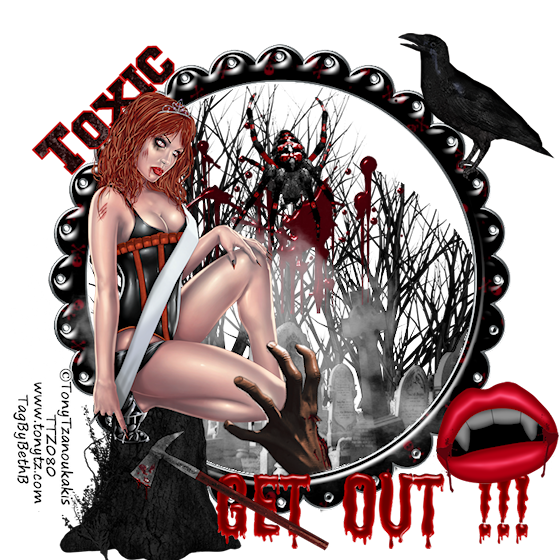
This tutorial is my creation & any resemblemces to others is purely accidental
Written by ToxicTutorialz on 9.2.12 in PSPX2
Written by ToxicTutorialz on 9.2.12 in PSPX2
Any version should work
Do Not Claim as Your own
Link Back to My Blog
Do Not Claim as Your own
Link Back to My Blog
Remember to SAVE Often!!!
Version of PSP
Version of PSP
Copy/Paste=C/P when used
Bring the following elements into psp and minimize
Axe,VampireMouth,Wordart,Crow,Spider,Cemetary,
Blood,Hand,Frame3,Deadtree,Fog,Deadbush, & Paper10
Axe,VampireMouth,Wordart,Crow,Spider,Cemetary,
Blood,Hand,Frame3,Deadtree,Fog,Deadbush, & Paper10
Open a 700 x 700 blank image
C/P your frame as new layer
Place in center
Use magicwand to select center of frame
C/P Deadbush as new layer Place at bottom inside frame on left side
Selections Invert Delete
Duplicate and place on bottom right side inside frame
Don't DESELECT yet!!
C/P the cemetary as new layer
Place inside frame at bottom
Hit delete
Now Deselect
Paste your fog as new layer inside frame
Repeat for bloodspatter
C/P your spider & place inside on cemetary
Paste your crow and resize if needed
Place on top right side of frame
C/P your tube as new layer
Resize to 40%
Place on left side at bottom
Paste the stump as new layer
Resize and place under tube
C/P the hand as new layer
Place inside of frame at bottom
Arrange it so that it looks as if its grabbing your tube
Now paste your remaining elements and place the way you like best
Add your copywrite
Pull paper9 into psp and set as your bg
Set fg to red
Font on Freshmen size 16,B=Bold,Stroke2
Type out your name Convert to Raster layer
Merge all visible
Resize to 80% smartsize all layers checked
Save as png
C/P your frame as new layer
Place in center
Use magicwand to select center of frame
C/P Deadbush as new layer Place at bottom inside frame on left side
Selections Invert Delete
Duplicate and place on bottom right side inside frame
Don't DESELECT yet!!
C/P the cemetary as new layer
Place inside frame at bottom
Hit delete
Now Deselect
Paste your fog as new layer inside frame
Repeat for bloodspatter
C/P your spider & place inside on cemetary
Paste your crow and resize if needed
Place on top right side of frame
C/P your tube as new layer
Resize to 40%
Place on left side at bottom
Paste the stump as new layer
Resize and place under tube
C/P the hand as new layer
Place inside of frame at bottom
Arrange it so that it looks as if its grabbing your tube
Now paste your remaining elements and place the way you like best
Add your copywrite
Pull paper9 into psp and set as your bg
Set fg to red
Font on Freshmen size 16,B=Bold,Stroke2
Type out your name Convert to Raster layer
Merge all visible
Resize to 80% smartsize all layers checked
Save as png

Saturday, September 1, 2012
Goddess of the Night
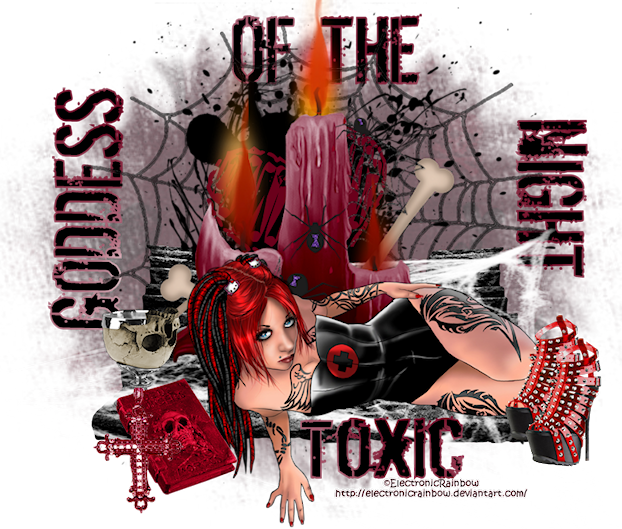
This tutorial is my creation & any resemblemces to others is purely accidental
Written by ToxicTutorialz on 8.31.12 in PSPX2
Any version should work
Written by ToxicTutorialz on 8.31.12 in PSPX2
Any version should work
Do Not Claim as Your own
Link Back to My Blog
Remember to SAVE Often!!!
Version of PSP
FTU GOTH Tube I used
Electronic Rainbow
Electronic Rainbow
Pull Ele29 into psp
Now pull Ele11 into psp
Copy/Paste as new layer onto your working image
Pull Ele4 into psp
C/P as new layer Resize to 75% Position on your spiderweb
Next bring Ele36 into psp and paste as new layer
Place toward the bottom and on the left Duplicate Image Mirror
Move the steps together
Pull Ele37 into psp
C/P as new layer Position on steps
Now paste your tube as new layer
Resize if necessary Place at bottom on steps
Now bring Elements 16 and 17 into psp
C/P as new layers Resize them as necessary
Place the book at bottom on the left side of the tube
Place the goblet behind the book
If you would like to add other elements do so now
I added elements 14 and 26
Pull paper5 into psp and paste as new layer
Move to the bottom of all layers on layer palette
Apply your grungy circle mask
Right click on mask layer and merge group
Move the opacity down to 65
Add your copywrite if you used a different tube
Pull paper 10 into psp and set as your FG BG set on Black
Font on Dirty Ego Size 26 Stroke2
Type out Goddess Use the picktool to turn up Place on the left side
use mine above for a guide
Now type out Of The Place at the top
Finally type out Night Use pick tool to turn down Place on the right side
Convert to raster layer
Merge all visible Resize to 80% all layers checked
Save as PNG
Now pull Ele11 into psp
Copy/Paste as new layer onto your working image
Pull Ele4 into psp
C/P as new layer Resize to 75% Position on your spiderweb
Next bring Ele36 into psp and paste as new layer
Place toward the bottom and on the left Duplicate Image Mirror
Move the steps together
Pull Ele37 into psp
C/P as new layer Position on steps
Now paste your tube as new layer
Resize if necessary Place at bottom on steps
Now bring Elements 16 and 17 into psp
C/P as new layers Resize them as necessary
Place the book at bottom on the left side of the tube
Place the goblet behind the book
If you would like to add other elements do so now
I added elements 14 and 26
Pull paper5 into psp and paste as new layer
Move to the bottom of all layers on layer palette
Apply your grungy circle mask
Right click on mask layer and merge group
Move the opacity down to 65
Add your copywrite if you used a different tube
Pull paper 10 into psp and set as your FG BG set on Black
Font on Dirty Ego Size 26 Stroke2
Type out Goddess Use the picktool to turn up Place on the left side
use mine above for a guide
Now type out Of The Place at the top
Finally type out Night Use pick tool to turn down Place on the right side
Convert to raster layer
Merge all visible Resize to 80% all layers checked
Save as PNG
Subscribe to:
Posts (Atom)
LinkWithin

About Me

Grab My Blinkies


I CT for


Script Tester 4

My Stalker Hits

Blogs I stalk

